Understanding Base Grids in Logo Design: Geometric Grid Systems Explained
Learn how square, isometric, hex, and golden ratio grid systems can improve structure and balance in your logo designs.
Learn how square, isometric, hex, and golden ratio grid systems can improve structure and balance in your logo designs.
As a logo designer with nearly a decade of experience, I’ve learned one thing...
Great logos start with a solid foundation - base grid.
Before creating a geometric logo, a grid system must be established. This is known as a base grid, which can give you balance, consistency, and a clean foundation to build on.
In this guide, I’ll show you a variety of grid systems you can use to create professional, timeless logos.
What Is a Base Grid?
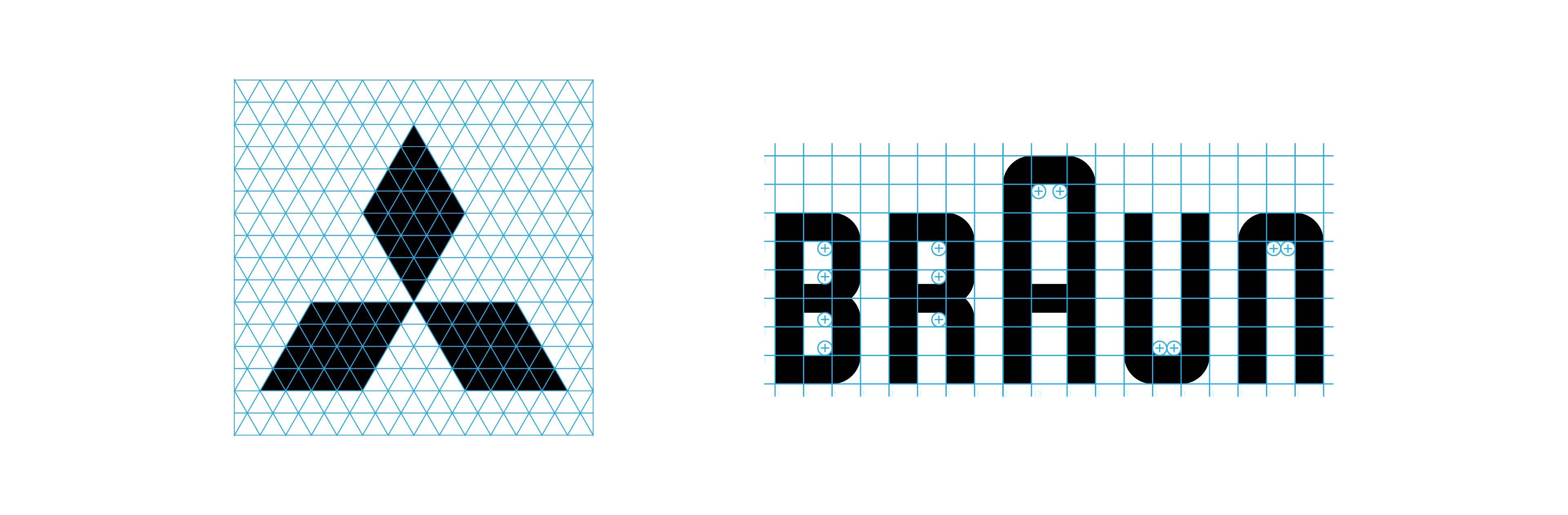
A base grid consists of outlines made from repeated geometric shapes and is used before starting a logo. It provides a clear structure to build on, helping the logo stay consistent, balanced, and precise from the very beginning.
Base Logo Grid
Base grids are different from construction grids, which are typically used after the logo is designed.
I break down the four main categories of logo grids in this article.
Think of base grids like scaffolding — you don’t see them in the final logo, but they’re what keep everything strong and stable while you build.
Why Use a Base Grid in Logo Design?
Creates structure and geometric consistency
Helps align shapes and spacing early on
Reduces errors and revisions later
Supports cleaner, more professional results
If you’re designing a logo with symmetry, clean shapes, or repeated elements, a base grid is your best friend.
Trust me, it’s better than recreating your logo five times because “something feels off.”
Although there are many different types of base grids, I will explain the 4 main grid systems used in logo design.
1. Square Base Grids
Square grids are the simplest form of logo grids, composed of equally spaced horizontal and vertical lines.
Best For:
Logos based on geometric shapes
Tech companies or brands seeking modern and minimal identities
Beginners practicing foundational grid work
2. Golden Ratio Grids
The golden ratio (~1.618) is a mathematical principle found in nature, architecture, and art. Golden ratio grids use circles and rectangles based on this ratio to construct balanced, naturally appealing logos.
Best For
Almost any type of logo
Organic/ natural logos
Refining a logo
3. Isometric Base Grids
Isometric grids use 30-degree angles to create three-dimensional-looking structures without traditional perspective distortion.
Best For
Tech-focused branding
Gaming and entertainment logos
Brands embracing futurism or innovation
4. Hexagon Base Grids
Hexagonal grids offer a unique geometric base that introduces movement, modularity, and visual rhythm into logo design.
With their evenly spaced angles and repeating patterns, hex grids are especially useful when designing logos that need a sense of connectivity, balance, or complexity.
It also includes an ebook, all about mastering logo grids inside Adobe Illustrator. You can start using the logo grids you learnt right away!
Automate Your Grid Systems with Base Grid Generator™
If you want to skip the manual setup, I built a tool called Base Grid Generator. It lets you create square, isometric, hex, and golden ratio grids right inside Illustrator, with just a few clicks.
I made it to save time and avoid the small mistakes that can throw things off. It’s part of how I work now, and it might help you too.